
Try the 3D Roomplanner
Click the button below to start planning your dream room in 3D!
The 3D Bedroom Planner by Decortipz is an intuitive tool for designing, customizing, and visualizing your home interiors in a realistic 3D environment. Now, Decortipz contains “Free 3D bedroom planner tools.” So, make your room 3D online with Decortipz.
Important and Main points
What is the 3D Room Planner?
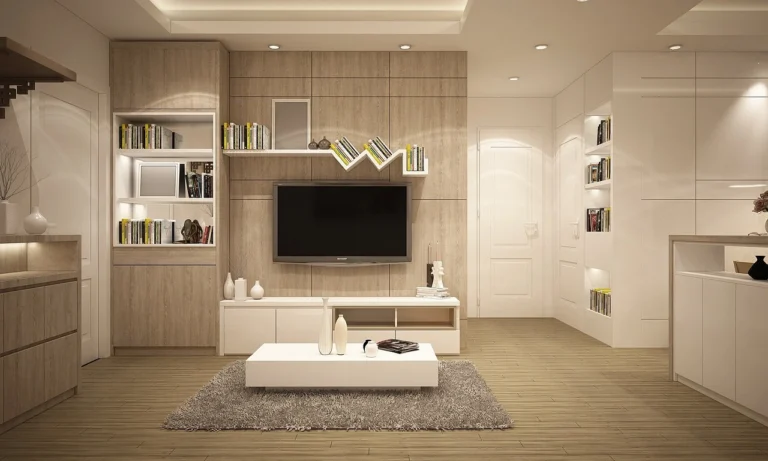
The Decortipz 3D Room Planner is an intuitive design tool that helps you create and visualize the layout of any room in your home. This planner allows you to experiment with various designs and furniture arrangements in a 3D environment, from living rooms to bedrooms, kitchens, and even outdoor spaces.

With the planner, you can select room dimensions, add walls, place windows and doors, and fill your space with furniture, fixtures, and decor elements from an extensive library. The tool is designed to be accessible to everyone, from beginner home designers to professional decorators.
Key Features of the Decortipz 3D Room Planner
1. Easy Room Setup
Start by setting the room dimensions. Whether it’s a large living room, a cozy bedroom, or an outdoor patio, simply input your room’s dimensions and the planner creates a 3D representation of the space. You can also easily add doors, windows, and other architectural elements to match your setup.
2. Vast Furniture and Decor Library
Our 3D Room Planner offers an extensive catalog of furniture, appliances, and decor items. You can browse different styles, including modern, minimalist, traditional, and rustic designs, to find the perfect pieces that suit your taste. From couches and tables to rugs and lighting fixtures, our library has everything you need to create a complete room design.
3. Customization Options
What sets the Decortipz 3D Room Planner apart is its high level of customization. You can adjust most objects’ color, material, and size to fit your vision. Want a couch that matches your current décor? Change its color! Need a bookshelf in a custom size? Resize it! This level of flexibility ensures that your designs accurately represent your ideas.
4. 360° Room View
One of the most exciting features of the planner is the ability to view your room from every angle. The 360° room view lets you explore your design in immersive detail, ensuring every element looks perfect. Whether you want to check the layout from the entrance or see how the light hits your furniture at different times of the day, this feature brings your room to life.
5. Drag-and-Drop Functionality
Designing your room is as simple as dragging and dropping items from the catalog into your space. You can quickly rearrange furniture, experiment with different layouts, and see how different pieces work together in real-time.
6. Save and Share Your Designs
Once you’ve created your room, you can save the design and revisit it later. If you’re working with an interior designer or sharing ideas with family, you can easily export your room plan and share it with others. This makes collaboration a breeze, whether you’re planning your dream kitchen or deciding on the best layout for your living room.
How to Use the 3D Room Planner by Decortipz
Step 1: Choose Your Room Layout
Start by selecting the type of room you want to design. The 3D Room Planner offers preset layouts for living rooms, bedrooms, kitchens, bathrooms, and outdoor spaces. You can either use a pre-existing room shape or create a custom layout by entering your room’s exact dimensions.
Step 2: Add Architectural Elements
Once the room is set up, it’s time to add doors, windows, and other architectural elements. This is important because it affects how furniture and decor are placed within the room. You can move doors and windows to match your real space, ensuring your design will fit when it’s time to implement.
Step 3: Choose Furniture and Decor
Now comes the fun part! Browse the extensive library of furniture and decor items. You can experiment with furniture layouts to see what works best for your space. Try placing the bed against different walls if you’re designing a bedroom. Experiment with seating arrangements to optimize space and flow if it’s a living room.
Step 4: Customize Materials and Colors
After placing your furniture, you can customize its materials and colors to match your style. Try out different color schemes or experiment with materials like wood, metal, or fabric to see how they impact the overall vibe of your room.
Step 5: Explore with 360° View
Once you’ve arranged your furniture and decor, take advantage of the 360° view feature to walk through your space. This immersive view will help you spot any design flaws or areas for improvement. Adjust furniture placement and see how lighting interacts with different elements to ensure everything is perfect.
Step 6: Save and Share
When you’re satisfied with your design, save your room layout for future reference. You can return to it later to make adjustments or share it with friends, family, or interior designers for feedback.
Why Use the Decortipz 3D Room Planner?
1. Save Time and Money
Planning your room with a 3D room planner allows you to experiment with different designs without committing to costly furniture or renovations. You can test out different layouts and styles before making any purchases, ensuring that you’re happy with your design decisions before spending money.
2. Visualize Your Dream Home
One of the biggest challenges in home design is visualizing how everything will come together. With the Decortipz 3D Room Planner, you can see exactly how your ideas will look in real life. This helps eliminate guesswork and gives you confidence that your room will look just as good as you imagined.
3. Perfect for DIY and Professional Designers
Whether you’re a homeowner with a passion for DIY projects or a professional interior designer working with clients, the Decortipz 3D Room Planner offers the tools you need to bring your designs to life. The drag-and-drop interface makes it easy for anyone to use, while the detailed customization options provide professionals with the precision they need to create polished, professional-grade designs.
🧠 My Experience with a 3D Room Planner
In my experience working with homeowners and designers, using a 3D room planner completely changes how you approach interior design. Before 3D planning tools, I often saw people struggle to visualize how furniture, lighting, and color schemes would look in real life —leading to costly mistakes. The 3D Room Planner by Decortipz allows users to visualize their ideas through a realistic virtual space, which functions as a testing area before any purchasing or design alterations take place. The drag-and-drop interface and 360° view enable me to test different furniture arrangements and decorative element positions without needing to doubt my decisions. The tool enhances both design decision-making processes and user satisfaction during design work.
Conclusion
The 3D Room Planner by Decortipz is your go-to tool for creating beautiful, functional spaces in your home. Whether you’re redesigning a single room or planning an entire home renovation, this tool offers everything you need to visualize and perfect your ideas. Try the planner today and see your dream home come to life, all without lifting a hammer.
FAQ’S
1. What is a 3D Room Planner?
A 3D Room Planner is an online design tool that lets you create and visualize room layouts in three dimensions, including walls, windows, furniture, and décor elements.
2. How does a 3D planner help with interior design?
It allows you to experiment with layouts, furniture placement, colors, and materials in a virtual space before making real-world changes, saving time and money.
3. Is the Decortipz 3D Room Planner easy to use?
Yes — it offers intuitive drag-and-drop tools and a large library of furniture and décor items, suitable for beginners and professionals alike.
4. Can I customize furniture and décor in the planner?
Yes — most objects can be resized, recolored, and adjusted to fit your design vision.
5. Does the planner support different room types?
Yes — you can design bedrooms, living rooms, kitchens, bathrooms, and outdoor spaces.
6. Can I save and share my room designs?
Most 3D planning tools let you save your designs and share them with family, friends, or professionals for feedback.
7. Are 3D Room Planners free to use?
Many planners offer free versions, though some advanced features might require a subscription or a one-time fee, depending on the platform.
8. How accurate are 3D planner visualizations?
3D tools are very realistic and help you see spatial relationships and décor interactions better than 2D sketches.
9. Can I use it on my phone or tablet?
Several 3D room planners offer mobile apps or responsive web tools that work on tablets and phones.
10. Does using a 3D planner reduce design mistakes?
Yes, because you can visualize designs and make adjustments virtually before implementing them in real life, reducing errors and costly changes.

Hi, I’m the author of Decortipz — the creative voice behind the platform.I’m a passionate interior design enthusiast and student who loves combining creativity with real-world practicality to create modern, affordable, and stylish living spaces. From cozy living room makeovers and small apartment gardens to smart storage solutions, I focus on ideas that actually work in everyday homes.
Through Decortipz, my goal is to inspire homeowners and renters alike with easy-to-follow design tips, thoughtful insights, and up-to-date decor trends. I believe every space—no matter the size or budget—has the potential to feel beautiful, functional, and personal. Join me as we turn ordinary spaces into homes that truly shine.